
Gmail / Outlook
Keep your threads, send and receive, either from your mail client or inside Coax. Your choice.
Works Both Ways
Your inbox or Coax - you decide
Connect your Gmail or Outlook account and keep working exactly how you want. Reply from your mail client and it syncs to Coax. Reply from Coax and it syncs to your mail client. Every thread stays intact, every conversation in one thread.
- Send and receive from Gmail or Outlook as normal
- Or send and receive directly from inside Coax
- Threads stay linked across both platforms
- Your team sees every email conversation alongside calls, DMs, and SMS
Gmail
Full two-way sync with your Google Workspace or personal Gmail
Outlook
Full two-way sync with Microsoft 365 or Outlook accounts
Compose in Coax
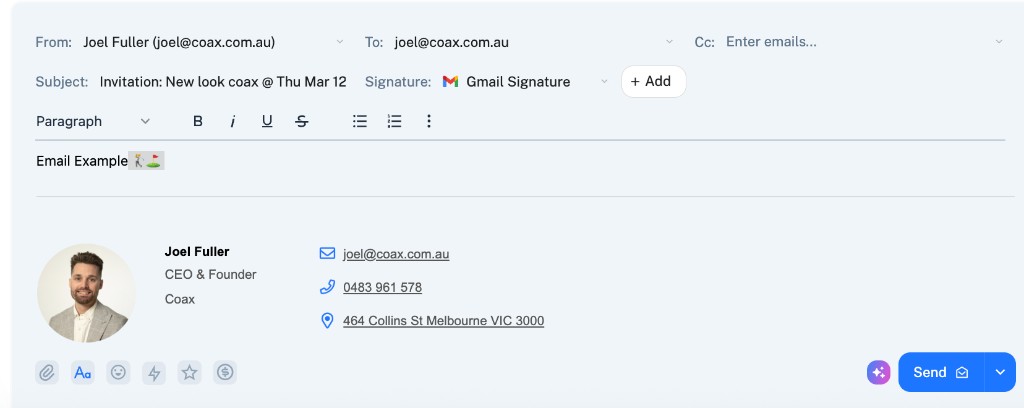
Gmail / Outlook style compose
Compose emails inside Coax with the same familiar layout - From, To, Cc, Subject, rich text editor, and your signature. Send from your mail client or directly from Coax.
Email Signatures
Include your signatures or create new ones
Your existing email signatures carry over automatically. Or create and manage signatures directly from within Coax. Professional emails, every time.
- Existing Gmail / Outlook signatures sync automatically
- Create and edit signatures inside Coax
- Different signatures for different team members
- Consistent branding across every outbound email
Send Alias
Send from any alias
Need to send from a shared address like info@ or support@? Coax lets you choose which email address you send from, so customers always see the right sender.
One Conversation
Email sits alongside every other channel
When a customer emails you, it lands in the same conversation as their calls, DMs, SMS, and WhatsApp messages. Full context, zero tab-switching.
Threaded emails
Full email threads preserved exactly as they appear in your mail client
Attachments
Send and receive files, images, and documents without leaving Coax
Team visibility
Everyone sees the email thread alongside calls, DMs, and SMS
AI summaries
Your AI Assistant summarises long email threads so you can respond faster
Team Email
Shared inboxesAvailable now
Manage customer email together in a shared inbox. Keep your team's email conversations in Coax, alongside calls, DMs, SMS, and WhatsApp.
See what else Coax has to offer here →